A unified storage solution holds the key to a transformed data management experience. Discover why data storage is a mess and how to fix it.


We need to end the disaster of disparate storage in data engineering. We’ve been so used to the complexities of multiple data sources and stores as isolated units, we consider it part of the process. Ask a Data Engineer what their usual day looks like, and you’ll get an elaborate spiel on overwhelming pipelines with a significant chunk dedicated to integrating and maintaining multiple data sources.
Having a single isolated lake is far from the desired solution. It eventually results in the same jumbled pipelines and swampy data- the two distinct nightmares of a data engineer. There is a dire need to rethink storage as a unified solution. Declaratively interoperable, encompassing disparate sources into a single unit with embedded governance, and independent to the furthest degree.
Let’s all agree based on historical evidence, disruptive transformations end up costing us more time and resources than the theoretical plan and given the data domain is mined with rapidly evolving innovations, yet another disruption with distant promises is not ideally favourable for practical reasons.
So instead, let’s approach the problem with a product mindset to optimise storage evolution- what are the most expensive challenges of storage today, and how can they be pushed back non-disruptively?
If storage continues to be dealt with as scattered points in the data stack, given the rising complexity of pipelines and the growth spurt of data, the situation would escalate into broken, heavy, expensive, and inaccessible storage.
The most logical next step to resolve this is a Unified Storage paradigm. This means a single storage port that easily interoperates with other data management tools and capability layers.
Instead of disparate data sources to maintain and process, imagine the simplicity if there was just one point of management. No complication while querying, transforming, or analyzing because there’s only one standardized connection that needs to be established instead of multiple integrations, each with a different access pattern, philosophy, or optimization requirement.
Most organizations, especially those at considerable scale, have the need to create multiple storage units, even natively, for separation of concerns, such as for different projects, locations, etc. This means building and maintaining storage from scratch for every new requirement. Over time, these separate units evolve into divergent patterns and philosophies.
Instead, with Unified Storage, users create modular instances of storage with separately provisioned infrastructure, policies, and quality checks- all under the hood of one common storage with a single point of management. Even large organizations would have one storage resource to master and maintain, severely cutting down the cognitive load. Each instance of storage does not require bottom-up build or maintenance, just a single spec input to spin it up over a pre-existing foundation.

In existing storage constructs, streaming is often considered a separate channel and comes with its own infrastructure and tooling. There is no leeway to consume stream data through a single unified channel. The user is required to integrate disparate streams and optimize them for consumption separately. Each production and consumption point must adhere to the specific tooling requirements.
Unified streaming allows direct connection and automated collection from any stream, simplifies transformation logic through standardized formats, and easily integrates historical or batch data with streams for analysis. An implementation of unified storage, such as Fastbase, supports Apache Pulsar format for streaming workloads. Pulsar offers a “unified messaging model” that combines the best features of traditional messaging systems like RabbitMQ and pub-sub (publish-subscribe) event streaming platforms like Apache Kafka.
We often see in existing data stacks how complex it is to govern data and data citizens on top of data management. This is because the current data stack is a giant web of countless tools and processes, and there is no way to infuse propagation of declarative governance and quality through such siloed systems. Let’s take a look at how a Unified Architecture approaches this.
Unified storage has the ability to embed storage as an inherent feature due to high interoperability and metadata exposure from the storage resources and downstream access points such as analytical engines. Storage is no longer a siloed organ, but right in the middle of the core spine, aware of transmissions across the data stack. This awareness is key to speedy RCA, and, therefore, better experience for both data producers and consumers.
Within the scope of this section, we’ll cover how we’ve established the unification of storage-as-a-resource through some of our native development initiatives.
Icebase is a simple and robust cloud-agnostic lakehouse, built to empower modern data development. It is manifested using the Iceberg table format atop Parquet files inside an object store like Azure Data Lake, Google Cloud Storage, or Amazon S3. It provides the necessary tooling and integrations to manage data and metadata simply and efficiently, as well as inherent interoperability with capabilities spread across layers inside the unified architecture of the data operating system.
While Icebase manages OLAP data, Fastbase supports Apache Pulsar format for streaming workloads. Pulsar offers a “unified messaging model” that combines the best features of traditional messaging systems like RabbitMQ and pub-sub (publish-subscribe) event streaming platforms like Apache Kafka.
Users can provision multiple instances of Icebase and Fastbase for their OLAP, streaming, and real-time data workloads. Let’s look at how these storage modules solve the pressing problems of data development that we discussed before.
A developer needs to avoid the hassle of pushing credentials into source systems or raising tickets for access every time before starting to engineer a new asset. At the same time, having robust and enforceable policies in place is necessary to prevent breaches in the security of both raw data and data products. Two resources within a data operating system – Depot and Policy – come together with Icebase to manage a healthy tradeoff between access and security.
To add to this, Minerva – the querying engine of the DataOS – brings together unified access and on-demand computing to enable both technical & non-technical users to achieve outcomes without concern about the heterogeneity of their current data landscape, thus significantly reducing iterations with IT.
The unified storage architecture allows you to connect and access data from managed and unmanaged object storage by abstracting out various protocols and complexities of the source systems into a common taxonomy and route. This abstraction is achieved with the help of “Depots”, which can be comprehended as a registration for data locations to make them systematically available to the wider data stack.
A depot assigns a unique address to every source system in a uniform format. This is known as the Universal Data Link (UDL), and it allows direct access to datasets without having to specify credentials again. dataos://[depot]:[collection]/[dataset]
In Pulsar, topics are the named channels for transmitting messages from producers to consumers. Taking this into account, any Fastbase UDL (Universal Data Link) within the DataOS is referenced as dataos://fastbase:<schema_name>/<dataset_name>, where dataset is a pulsar topic. Similarly, an example Icebase UDL will look like dataos://icebase:retail/city
Depots have default access policies built in to ensure secure access for everyone in the organization. It is also possible to create custom access policies to access the depot and data policies for specific datasets within it. This is only for accessing the data, not moving or copying it.
Being completely built on open standards, extending interoperability to non-native components outside the operating system is possible through standard APIs.
Connection to a depot opens up access to all the capability layers inside a unified data architecture, including governance, observability, and discoverability. The depot is managed by a Depot Service which provides:
Minerva is an interactive query engine based on Trino. It allows users to query data through a single platform across heterogeneous data sources without needing to know each database’s specific configuration, query language, or data format.
The unified data architecture enables users to create and tune multiple Minerva clusters as per the query workload, which helps in using your compute resources efficiently and scaling up or down depending on the demand flexibly. Minerva provides the ability to create and tune the necessary amount of compute.
Say we want to find the customer(s) who made the highest order quantity purchases for any given product and the discount given to them, for which the data has to be fetched from two different data sources – an Azure MS-SQL and a PostgreSQL database. First, we’ll create depots to access the two data sources and then a Minerva cluster. Once this is in place, we can seamlessly run queries across the databases, and tune our Minerva cluster according to the workload if necessary.
Creating Depots
Write the following YAML files to connect two different data sources to the Unified Storage resource.
Microsoft Azure SQL Database Depot
PostgreSQL Database

Use the apply command in the CLI to create the Depot resource


Creating the Query Cluster
To enhance the performance of your analytics workloads, choose appropriately sized clusters, or create a new dedicated cluster for your requirements. In this example, a new cluster is created.

Use the apply command to create the Cluster

Now, we can run the below query on two different data sources as if we are querying from a homogenous plane that hosts all tables from across these two sources. The results are shown here in Workbench, a native web-based analytics tool in DataOS.


Minerva (query engine) can perform query pushdowns for entire or parts of queries. In other words, it can push processing closer to the data sources for improved query performance.
‘Policy’ is an independent resource in a unified data architecture that defines rules of relationship between subjects (entities that wish to perform actions on a target), predicates (the action), and objects (a target). Its ABAC (attribute-based access control) implementation uses tags and conditions to define such rules, enabling coarse-grained role-based access to datasets and fine-grained access to individual items within the dataset.
Tags, which can be defined for datasets and users, are used as attributes. As soon as a new source or asset is created, policies pertaining to its tags are automatically applied to them. Changing the scope of the policy is as simple as adding a new attribute or removing an existing one from the policy. Special attributes can be written into the policy and assigned to a specific user if the need for exceptions arises. The attribute-based definition makes it possible to create fewer policies to manage the span of data within an organisation, while also needing minimal changes during policy updates.
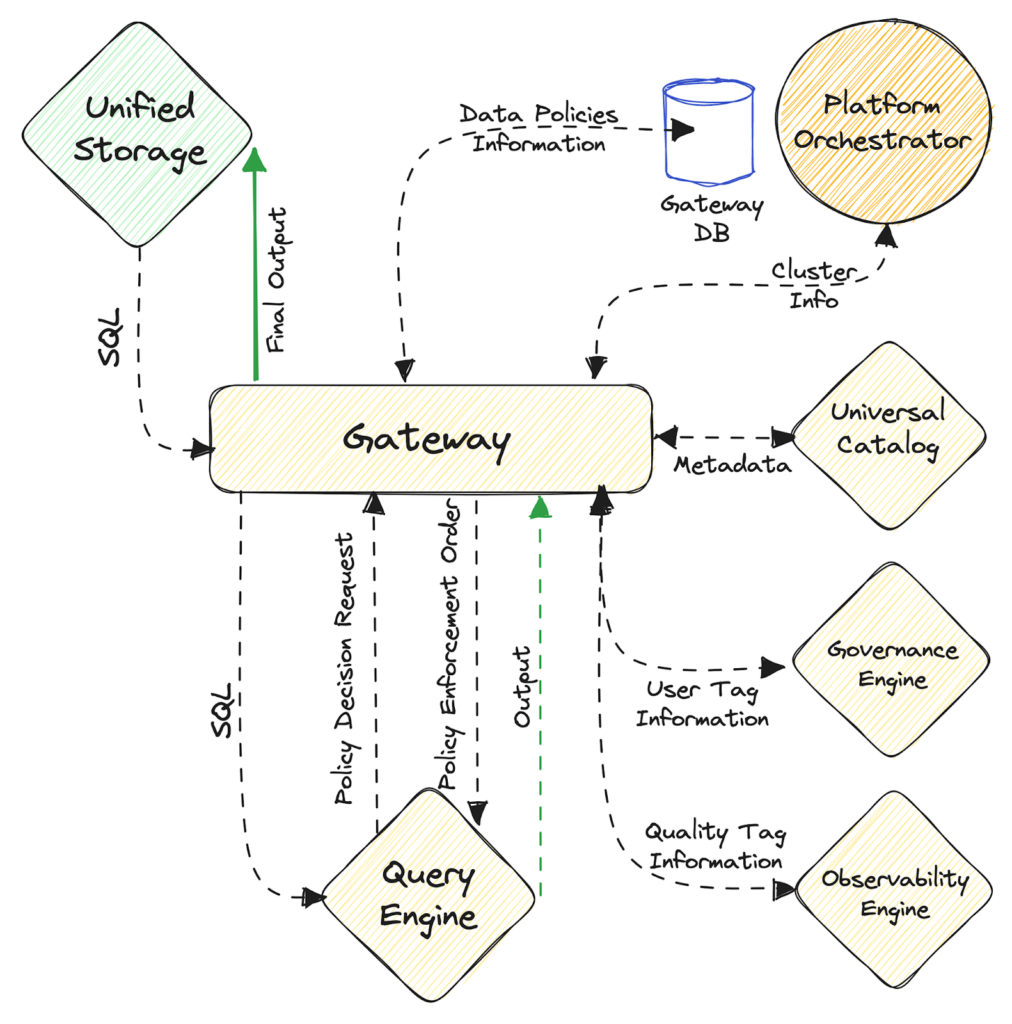
For the purpose of enforcing policies across all data sources while accessing them, a Gateway Service sits like an abstraction above Minerva (query engine) clusters. Whenever a query is fired from any source (query tool, app, etc.), Gateway parses and formats the query before forwarding it to the Minerva cluster. After receiving the query, Minerva analyzes it and sends a decision request to Gateway for the governance to be applied. Gateway reverts with a decision based on user tags (received from the governance engine) and data-policy definition (which it stores in its own database – Gateway DB).
Based on the decision, Minerva applies appropriate governance policy changes like filtering and/or masking (depending on the dataset) and sends the final result set to Gateway. The final output is then passed to the source where the query was initially requested.
A unified storage architecture that provides advanced capabilities needs equally advanced maintenance. Thus, built-in capabilities to declaratively manage and maintain data and metadata files are a necessity.
In Icebase or the lakehouse construct, these operations can be performed using a “Workflow” – a declarative stack for defining and executing DAGs. The maintenance service in Workflow is offered through “actions“, which is defined in its own section within a YAML file. Below are examples of a few actions for seamless data management.
Rewrite Dataset
Having too many data files leads to a large amount of metadata in manifest files, while small data files result in less efficient queries and higher file open costs. This issue can be resolved through compaction. Utilizing the rewrite_dataset action, the data files can be compacted in parallel within Icebase. This process combines small files into larger ones, reducing metadata overhead and file open costs during runtime. Below is the definition for the rewrite_dataset action.

Expire Snapshots
Writing to an Iceberg table in an Icebase depot creates a new snapshot of the table, which can be used for time-travel queries. The table can also be rolled back to any valid snapshot. Snapshots accumulate until the expire_snapshots action expires them. It is recommended to regularly expire snapshots to delete unnecessary data files and keep the size of the table metadata small.

Garbage Management
While executing Workflows upon Icebase depots, job failures can leave files that are not referenced by table metadata, and in some cases, normal snapshot expiration may not be able to determine if a file is no longer needed and delete it. To clean up these ‘orphan’ files under a table location older than a specified timestamp, we can use the remove_orphans action.

Delete from Dataset
The delete_from_dataset action removes data from tables. The action accepts a filter provided in the deleteWhere property to match rows to delete. If the delete filter matches entire partitions of the table, Iceberg format within the Icebase depot will perform a metadata-only delete. If the filter matches individual rows of a table, then only the affected data files will be rewritten. The syntax of the delete_from_dataset action is provided below:

Iceberg generates Snapshots every time a table is created or modified. To time travel, one needs to be able to list and operate over these snapshots. The lakehouse should provide simple tooling for the same. The Data Toolbox provides the functionality for metadata updating through the set_version action, using which one can update the metadata version to the latest or any specific version. This is done in two steps –
Using the CLI
The CLI on top of a unified data architecture can be used to work directly with Snapshots and metadata. For example, a list of snapshots can be obtained with the following command –

To travel back, we can set a snapshot at the desired timestamp.

One can also list all metadata files, and metadata can also be set to the latest or some specific version using single-line commands.
Partitioning is a way to make queries faster by grouping similar rows together when writing. We can use both the Workflow stack through a YAML file and the CLI to work with Partitions in Icebase. The following types of Partitions are supported: timestamp (year, month, day and hour) and identity (string and integer values).
You can partition by timestamp, identity, or even create nested partitions. Below is an example of partitioning by identity.
If the partition field type is identity type, the property ‘name’ is not needed.
Workflow:

CLI:

Thanks to Iceberg, when a partition spec is evolved, the old data written with an earlier partition key remains unchanged, and its metadata remains unaffected. New data is written using the new partition key in a new layout. Metadata for each of the partition versions is kept separately. When you query, each partition layout’s respective metadata is used to identify the files it needs to access; this is called split planning.
Say, we are working on a table “NY Taxi Data”. The NY Taxi data has been ingested and is partitioned by year. When the new data is appended, the table is updated to partition the data by day. Both partitioning layouts can co-exist in the same table. The query need not contain modifications for the different layouts.
In essence, let’s summarize with the understanding that siloed storage is a deal breaker when it comes to data management practices. In the article, we saw how data stored, accessed, and processed in siloes creates a huge cognitive overload for data developers as well as eats up massive resources. On the contrary, a unified storage paradigm bridges the gap between different capabilities essential to the data stack and helps users produce and consume data as if data were one big connective tissue. Users can access data through standardized access points, analyze it optimally without fretting about specific engines and drivers, and most essentially, rely on that data that arrives on their plate with embedded governance and quality essentials.
Animesh Kumar is the CTO & Co-Founder The Modern Data Company, and a founding contributor to the Data Developer Platform Infrastructure Specification that enables flexible implementation of disparate data design architectures such as data products, meshes, or fabrics. He has architected engineering solutions for several A-Players, including the likes of NFL, GAP, Verizon, Rediff, Reliance, SGWS, Gensler, TOI, and more. Animesh shares his thoughts on innovating a holistic data experience on ModernData101. Travis Thompson is the Chief Architect of DataOS and a key contributor to the Data Developer Platform Infrastructure Specification that enables flexible implementation of disparate data design architectures such as data products, meshes, or fabrics. Over the course of 30 years in all things data and engineering, he has designed state-of-the-art architectures and solutions for top organizations, the likes of GAP, Iterative, MuleSoft, HP, and more.
Cloud Data Insights is a blog that provides insights into the latest trends and developments in the cloud data space. We cover topics related to cloud data management, data analytics, data engineering, and data science.
Property of TechnologyAdvice. © 2026 TechnologyAdvice. All Rights Reserved
Advertiser Disclosure: Some of the products that appear on this site are from companies from which TechnologyAdvice receives compensation. This compensation may impact how and where products appear on this site including, for example, the order in which they appear. TechnologyAdvice does not include all companies or all types of products available in the marketplace.